



Running a small business in Singapore means every minute counts. Managing payments, tracking invoices, and waiting for clients to pay can take up valuable time.
Digital tools like InvoiceNow promise faster, more accurate invoicing that keeps cash flow steady and admin work low. InvoiceNow saves more time than traditional invoicing by sending invoices instantly between systems, cutting manual steps and delays that slow payments.
Traditional invoicing often involves manual entry, PDF attachments, and follow-ups that take hours each week. Missed emails, typos, or late payments can create bigger financial headaches.
InvoiceNow connects your invoicing system directly to your customers, reducing mistakes and speeding up payment processing across Singapore’s Peppol network.
For small and medium enterprises, switching to digital invoicing means working smarter. You get faster payments, clearer records, and less back-and-forth communication.
Key Takeaways
- InvoiceNow helps automate invoicing and reduce delays.
- Traditional methods require more manual work and follow-ups.
- Choosing the right system can improve cash flow and efficiency.
What Is InvoiceNow?
InvoiceNow is a nationwide e-invoicing network in Singapore. It lets you send invoices directly from your system to your customer’s system in a structured digital format.
You exchange data instantly through a secure and standardised network, improving speed and accuracy across business transactions. You no longer rely on PDFs or paper.
How InvoiceNow Works
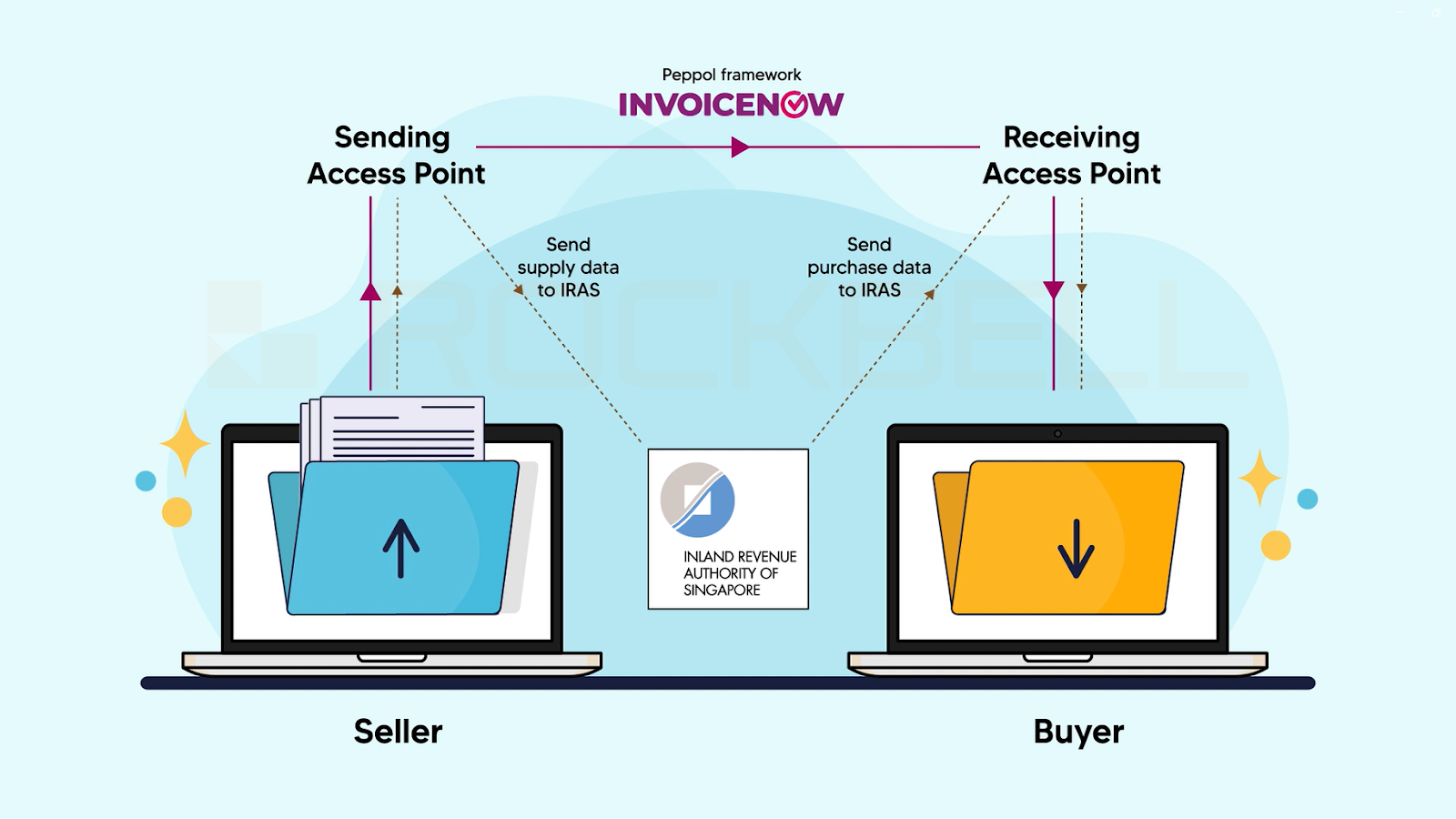
InvoiceNow operates on the Peppol network, an open, international standard for e-invoicing. Your accounting or finance system communicates through a Peppol Access Point to your customer’s Access Point.
The invoice appears directly in their system, already formatted and ready to process. Each Access Point acts as a gateway that checks and routes invoices safely between you and your trading partners.
Because invoice data follows a common format, you reduce manual entry and misunderstandings about amounts, dates, or tax details. You no longer need to attach or email PDF invoices, which can get lost or delayed.
Invoices move seamlessly between systems, keeping both sides in sync and making the process faster and more secure.
Key Features of InvoiceNow
InvoiceNow offers several tools that support compliance and efficiency for your business:
| Feature | Description |
| Structured Data Format | Uses Peppol BIS specifications to keep invoice details consistent. |
| Direct e‑Delivery | Sends invoices through accredited Access Points instead of email. |
| GST Data Transmission | Allows direct submission of invoice data to IRAS for tax reporting. |
| Status Tracking | Lets you know when customers receive or process your invoice. |
| Dual Workflow Support | Works alongside current invoicing processes if partners aren’t Peppol‑ready. |
These features reduce duplicate work and speed up payment cycles. You spend less time following up on payments because both systems keep records automatically.
Integration With Accounting Systems
Most accounting and ERP software in Singapore already support InvoiceNow or can do so with an add-on. You can link your existing tools — such as Xero, Autocount, or Million — to send and receive Peppol invoices without changing your current workflow.
Integration means your invoices are created and transmitted directly from your software. Updates and payments also sync automatically, so you always have accurate, real-time information.
If some customers or suppliers do not use InvoiceNow, you can still handle them using traditional methods. This flexibility makes it easier to adopt without disrupting daily operations.
How Traditional Invoicing Operates
Traditional invoicing uses manual steps that rely on people entering data, printing documents, and tracking payments by hand. It often involves paper or emailed PDFs and depends on your team to handle each stage carefully to avoid errors and delays.
Processes Involved in Manual Invoicing
You usually start by creating an invoice using a word processor, spreadsheet, or accounting template. Next, you fill in customer information, product or service details, prices, and tax amounts manually.
After that, you print or email the invoice and wait for payment confirmation. Most SMEs use ledgers or spreadsheets to track outstanding invoices.
This step takes time and often requires you to double-check entries against bank statements. When customers query amounts or payment status, you have to search through emails or paper files for details.
Because this process depends on people, mistakes happen easily. A missing zero or a mistyped date can cause disputes or late payments.
Over time, these errors can lead to slower cash flow and extra administrative work for your staff.
Paper vs. Email Invoices
Both paper and email invoices follow the same basic structure, but they differ in how they reach your customers. Paper invoices need printing, envelopes, and postage.
You or your team must deliver or mail them, which adds cost and time. Email invoices, often sent as PDF attachments, remove postage delays and paper use.
Email invoices reach clients faster, but they still require manual creation and tracking. You still have to remind customers to pay and manually update your records once payment arrives.
Here’s a quick snapshot of how the two formats compare:
| Type | Delivery Time | Cost to Send | Record Keeping | Risk of Error |
| Paper | Days | High (printing, postage) | Physical filing | Medium |
| Email (PDF) | Minutes | Low | Digital folders | Medium |
Even with digital documents, both formats still rely heavily on manual input and follow-ups.
Common Challenges for SMEs
Manual invoicing often slows your business operations. You spend hours checking details, matching payments, and chasing overdue bills.
It also limits your ability to track invoices in real time.
Common challenges include:
- Slow payment cycles due to mailing or long approval steps.
- Data errors from retyping or misfiling information.
- Extra storage needs for paper invoices or large email attachments.
For SMEs without dedicated finance staff, these tasks take focus away from sales and customer service. The lack of automation makes the process longer and less consistent.
Comparing Workflow Efficiency
Efficient invoicing keeps your cash flow steady and reduces admin headaches. Using digital tools like InvoiceNow changes how you create, send, and track invoices.
You get quicker results and fewer errors compared to manual paperwork.
Automation Vs. Manual Processes
When you use InvoiceNow, invoices move directly from your system to your customer’s system without manual steps. You skip printing, scanning, and retyping details into another platform.
That alone saves hours each week. Traditional invoicing usually means creating a PDF or paper invoice, emailing or mailing it, and waiting for someone to key in the data.
This slows payments and increases the chance of missing information. Automation cuts out these steps and helps you standardise invoice formats.
You can link data with accounting software and instantly confirm receipt. For a small business handling many transactions, this efficiency frees up time to focus on operations.
| Activity | Manual Invoicing | InvoiceNow (Automated) |
| Invoice creation | Manual entry | Auto-generated from system data |
| Delivery | Email or post | Sent directly via secure network |
| Status updates | Manual follow-up | Real-time acknowledgement |
Record-Keeping and Data Entry
Manual invoicing often requires separate spreadsheets or folders to keep records. You might have to check emails or stacks of paper to find a specific transaction.
With InvoiceNow, every invoice is stored digitally and linked to your accounting system. You don’t type or copy values from one document to another.
The data moves automatically, lowering the risk of typos or duplicates. That accuracy makes month-end reconciliation much easier.
InvoiceNow also supports secure storage that complies with IRAS e-invoicing standards. Your records stay accurate and retrievable if you need to review a past transaction or resolve a dispute.
Real-Time Tracking Benefits
Traditional invoicing gives you little visibility once the invoice leaves your hands. You might wait days to confirm if your customer even saw it.
With InvoiceNow, you can view delivery and status updates almost instantly. This visibility helps you manage cash flow more confidently.
You can follow up on pending payments faster instead of guessing if the invoice was received. Having real-time insight into sent, received, and processed invoices also helps you forecast revenue more accurately.
You save time chasing status updates and can plan your next steps using actual data.
Time Savings for Small Businesses
When you handle invoices faster and make fewer mistakes, you get paid sooner. This helps your cash flow stay steady and frees up time for other important work.
Invoice Creation Speed
Creating invoices manually takes time. You might fill out forms, check details, and send PDFs through email.
With InvoiceNow, you skip most of that. Your system sends invoices straight from your accounting software to your customer’s system using a secure digital network.
This speed comes from automation. You don’t need to re-enter information or attach files.
A few clicks are usually enough to issue an invoice. According to Singapore’s IMDA, businesses using InvoiceNow often receive payments up to 50% faster compared to paper or emailed invoices.
You also cut down on printing, scanning, and postage time. That means less waiting, fewer document errors, and quicker updates if clients ask for adjustments.
By reducing manual steps, small businesses can issue invoices nearly instantly and focus on more productive tasks.
Error Reduction and Corrections
When you prepare invoices by hand, small mistakes—like typos, missing tax information, or wrong totals—can slow everything down. Each correction adds back-and-forth emails and delays in payment.
With e-invoicing, most details fill automatically from your system, which lowers the chance of these errors. Automation helps you get it right the first time.
Instead of checking every number, you rely on data already verified by your accounting records. This consistency saves hours each month, especially if you handle many invoices.
If something still goes wrong, it’s easier to fix mistakes in an electronic invoice. You can resend updates immediately without reprinting or re-emailing everything.
Less manual correction also means fewer disputes and smoother communication with clients.
Approval and Payment Timelines
Once you send an invoice, the next wait is for approval and payment. With paper or PDF invoices, clients might take days to review them.
InvoiceNow sends invoices directly into their digital systems, so they can approve them right away. Automation shortens approval cycles.
Your clients receive standardised data that fits neatly into their accounts payable systems. No one has to key in amounts or double-check invoices against purchase orders by hand.
Faster approval leads to quicker payment. Some Singapore SMEs using InvoiceNow report that they reduce payment collection time by close to half.
A shorter timeline means steadier income and fewer hours spent chasing overdue payments. This reliability frees you to plan spending and reinvest with less stress.
Cost Implications Beyond Time
Switching from traditional invoicing to InvoiceNow changes more than just how fast you send or get paid. It affects how you handle admin work, printing expenses, and long-term costs tied to compliance and cash flow.
Manual invoicing takes time and often leads to human errors that cost money to fix. You may need admin staff to handle invoice data entry, chase payments, and store paper files.
These small tasks add up and increase your overheads. With InvoiceNow, most steps happen digitally.
Invoices move directly from your system to your customer’s, cutting down on back-and-forth emails and data re-entry. This automation helps reduce man-hours spent on simple admin jobs.
You also benefit from fewer delays. When payment information and invoice numbers sync in real time, tracking and reconciliation become easier.
Paper invoicing brings ongoing costs like ink, envelopes, postage, and storage. Keeping physical copies takes space, and losing or damaging invoices can lead to compliance problems.
You might even spend extra on physical archives or off-site storage. E-invoicing removes nearly all of that.
Everything stays digital, so you no longer need printers or filing cabinets for invoices. You also save on delivery time since invoices reach recipients instantly.
Use of InvoiceNow means every document is stored securely in your system, making it easier to find invoices for audits or reporting. These savings also reduce the environmental footprint of your business operations.
At first, switching to InvoiceNow may need some setup, like integrating your accounting software. But once in place, ongoing costs are typically lower than traditional invoicing.
You avoid reprinting, mailing, and manual labour fees, all of which compound over time. Digital invoicing also supports faster payments.
According to Singapore’s IMDA, businesses using InvoiceNow report receiving payments up to 50% faster than those using paper-based processes. That improved cash flow helps reduce borrowing costs and improves liquidity.
As your business grows, you can process more invoices without hiring extra staff, helping maintain predictable and sustainable operational costs.
Adoption and Learning Curves for SMEs
Switching to digital invoicing changes how you manage payments, train staff, and interact with clients. You’ll notice differences in setup time, technology needs, and available government help.
Ease of Transitioning to InvoiceNow
Moving from paper or PDF invoices to InvoiceNow can feel like a big step, but it’s simpler than it looks. Since it’s built on the Peppol standard, most accounting systems already support it or can integrate with it.
You don’t have to email invoices manually anymore; they go straight from your system to your customers. For smaller businesses without an ERP system, IMDA-approved service providers offer free or low-cost tools.
These options make adoption easier if you’re not ready to invest in complex software. You can usually keep your existing processes while automating data entry, which reduces human error and saves time.
The most challenging part is ensuring that your partners and clients are also using the network. If they aren’t, a hybrid of e-invoicing and traditional methods may be necessary for a while. Once most of your network is on InvoiceNow, daily operations become faster and more reliable.
Training and Onboarding
Getting your team used to a new invoicing system can take a little time. However, users often find InvoiceNow’s interface familiar, especially if they already use cloud accounting software.
The setup usually involves a quick registration, connecting your business ID, and learning how to send or receive structured e-invoices. It helps to plan short training sessions focusing on real examples.
For instance, practice creating and approving test invoices. This keeps the learning curve manageable and builds team confidence early on.
Many providers also offer self-guided tutorials, videos, and live chat support, which shorten the onboarding period. By the end of a week or two, most staff can handle routine tasks independently.
Having a dedicated person to manage the first few transactions also helps minimise confusion.
Support From Government Initiatives
Singapore’s government actively supports businesses making the switch. Through the Infocomm Media Development Authority (IMDA), you get access to approved vendor lists, setup guides, and even funding support for certain integrations.
Incentive schemes occasionally offset costs for SMEs adopting registered solutions. This reduces the financial risk of upgrading from manual invoicing tools.
Government-backed campaigns also raise awareness and encourage suppliers and buyers to join the same network. Another advantage is access to workshops and webinars that explain updates or new compliance requirements.
These resources make it easier to stay aligned with changing rules, especially as the 2025 e-invoicing mandate takes effect. With this guidance, you can adopt InvoiceNow more smoothly and confidently.
Choosing the Best Invoicing Solution for Your SME
Finding the right invoicing system helps you save time, reduce manual work, and stay compliant with digital requirements. The best choice fits your current operations while preparing you for future growth and integration needs.
Business Needs and Scalability
When choosing an invoicing solution, start by sizing up your daily workflow. Think about how many invoices you issue each month, how often you deal with repeat clients, and whether you need multi-currency support.
A small business might prefer a free InvoiceNow-ready tool for quick e‑invoicing. A growing SME may benefit more from an integrated ERP system that ties invoicing to inventory and finance.
Scalability also matters. You want software that can handle more users, higher transaction volumes, and integration with platforms like accounting or customer relationship management systems.
Many Singapore SMEs find cloud-based solutions easier to scale, since they can add features on demand without high upfront costs.
| Type | Best for | Key Benefit |
| Free invoicing tool | Small or new SMEs | Simple, low-cost start |
| ERP-integrated system | Growth-focused SMEs | Centralised data and automation |
Check if the solution is InvoiceNow-compatible. This ensures smoother connections with suppliers and customers within the national e‑invoicing network.
Evaluating ROI on Digital Adoption
Cost should not be your only concern. Consider how much time and effort digital invoicing saves compared to manual processing.
For instance, InvoiceNow sends invoices directly through the Peppol network, cutting down data entry errors and payment delays. List out measurable factors like:
- Time saved per invoice
- Reduction in administrative work
- Faster customer payments
An ERP solution may cost more at first, but its automation reduces overhead in the long run. Immediate savings come from fewer paper invoices and less time reconciling data.
Long-term ROI comes from enhanced accuracy, compliance, and real-time financial insights. You can also track improvements in cash flow and customer satisfaction as useful indicators of value.
Frequently Asked Questions
What’s the difference between InvoiceNow and old-school invoicing for us little businesses?
With InvoiceNow, your invoices go straight from your accounting system to your customer’s system through the PEPPOL network. You don’t need to print, email, or re-enter data, which helps you cut down on small but time‑consuming tasks.
Traditional invoicing often involves manual data entry, emailing PDFs, or chasing approvals. Each step adds delays and increases the chance of small mistakes.
Can I really save more time using InvoiceNow over paper invoicing, or is it just a bunch of hype?
You likely can save time because invoices sent through InvoiceNow reach customers instantly and auto‑populate their systems. That means fewer delays waiting for email replies or lost paperwork.
It’s not magic, though. You’ll still need to spend some time setting up the system and aligning it with your workflow first.
Are there any hidden time costs with setting up InvoiceNow for my company?
If you already use an accounting or ERP platform that supports InvoiceNow, setup can be quick. Some systems let you enable it right away with minimal changes.
If not, you may need to tweak your software or get help from your vendor. That can take extra time depending on how complex your setup is.
What do I need to know about the learning curve for my team when switching to InvoiceNow?
The basics are easy to learn since it works like your usual invoicing tools, just more automated. Most vendors also provide simple guides or short training sessions.
Your team may need time to get used to new steps in data entry or approval flows. Keeping the process straightforward helps everyone adjust faster.
How does InvoiceNow handle payment tracking compared to the traditional way?
With InvoiceNow, payment updates and statuses can sync automatically with your accounting system. You can see which invoices are paid or pending without chasing clients or matching receipts manually.
Paper or PDF invoices often rely on manual tracking or emails. That increases the risk of missing late payments or duplicating records.
Is the security of InvoiceNow better than the usual invoicing methods?
Yes, in most cases. InvoiceNow uses encrypted transmission through the PEPPOL network.
This reduces the risk of invoice fraud or tampering. Email invoices are more open to interception or fake payment instructions.
Switching to InvoiceNow helps protect both you and your customers.